

Can AI Make You a Better Game Designer?
okay, hear me out

Welcome to Game Design Bites - a personal take on game design, straight from years of experience in the industry!
If this interests you, subscribe to get game design insights straight to your inbox for free!

👋 It’s been a while
If this showed up in your inbox, consider it proof that you’re still subscribed. Please don’t unsubscribe just yet.
I haven’t posted in a while. Not because I ran out of ideas, but because procrastination quietly won, helped along by work, life, and everything that tends to pile up toward the end of the year. This post, in fact, has been sitting in my drafts long enough that AI tech probably evolved a lot while it waited.
Still, this one isn’t really about tools. It’s about thinking. And that part doesn’t age nearly as fast.
🤖 About that “vibe coding” thing
Vibe coding has become the new thing over the past year.
From people making serious money with vibe coded SaaS projects, to stories about entire products getting messed up because the people building them didn’t really know the basics, you’ve probably heard every version of it by now. It’s been hard to avoid, and even harder not to be curious about.
So of course, I gave it a try.
This isn’t a post about how to vibe code, or how not to. What interested me more was what you can actually get from the process. Specifically, what it offers when you look at it through the lens of designing games, rather than shipping code.
I spent some time playing around with different tools, mostly just experimenting and seeing how far I could get. Surprisingly, I ended up with a decent working example. That said, I’m fairly certain the code itself is terrible and nowhere close to production quality.
In fact, at this point, I’ve already asked for a few prompts, broken the code, and I don’t fully know how to recover it. Which, in a way, perfectly captures the experience.
And that’s where this became interesting.
🧪 So what did I actually do
I wanted to give this whole vibe coding buzzword a real try. With that said, my coding knowledge is somewhere between terrible and almost non existent. So I went in with a very simple objective. Don’t build something clever. Just make something work.
That constraint helped a lot.
I decided to aim for a small game like web app and started by asking myself a basic design question. What would be simple, familiar, and still a little fun to think about. That’s when I landed on book cricket, mostly driven by nostalgia.
If you grew up in the 90s, especially in India or maybe more broadly South Asia, you might remember this. It was one of those school games that needed almost nothing to play. You’d take any book, open a random page, look at the page number, and turn that into a score. Then you’d pretend you were playing an actual cricket match.
The rules were simple. You only looked at even numbered pages. The last digit of the page number was your score. If it was a 0, you were out. If it was an 8, which isn’t a real cricket score, you’d usually just agree to treat it as something else, often a 1. You could play with multiple wickets, add up your innings, and then compare scores with someone else. The exact details varied, but the core idea stayed the same.
As an example for a web app, this felt straightforward enough. Clear rules, minimal logic, and no complicated edge cases to worry about upfront. It felt like something that should be possible to get working, even with my limited ability to understand what was happening under the hood.
And spoiler alert. It worked.
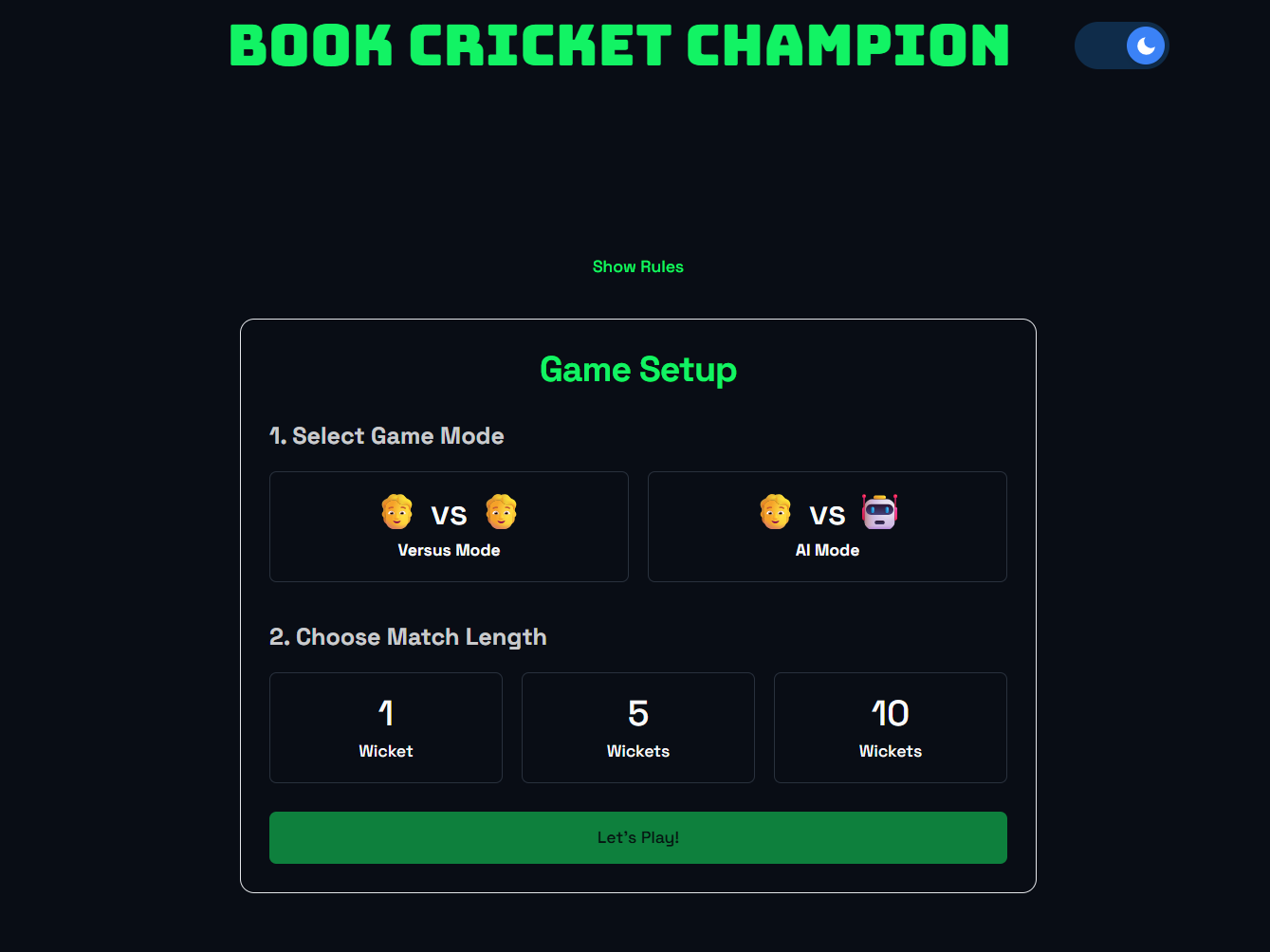
You can try the fully, 100 percent vibe coded version of the game here
🧠 What surprised me
To explore this properly, I used Google AI Studio and started playing around with it.
What stood out almost immediately was how easy it was to get something working. A few lines of explanation were often enough to get very close to what I had in mind. That part felt almost effortless, especially at the start, when the goal was simply to see anything respond in the way I expected.
The friction showed up later.
As soon as I wanted to tweak things, improve flow, or make small adjustments, vague prompts stopped being good enough. The AI needed clearer framing. More structure. Better thought through instructions. Without that, the results drifted away from what I was imagining.
The overall experience was still fun. I probably spent more time than I expected trying to get the project into a state where it could be hosted on a separate free platform.
I won’t go into the exact prompts I used here. What mattered more to me were the learnings and the thoughts that came out of trying this experiment in the first place.
If Game Design Bites helps you, here’s a simple way to show some love on Ko-fi.🧩 What it felt like
While doing all this, I couldn’t help but notice how much it felt like a compressed version of the design process.
I had to think about exactly what I wanted, how it should work, and then explain it clearly in my prompt so the AI actually built what I had in mind. That’s a lot like most of game design, isn’t it?
As a designer, part of your job is figuring out what the design should be and how things should work. But the bigger part, often the harder part, is explaining it to the team.
Unless you’re a rare one-person project, making a game means collaborating. Engineers, artists, producers, analysts, all of them interpret your intent through the clarity of your explanation.
AI just compresses that feedback loop. If your thinking isn’t clear, the output shows it immediately. It’s a stark reminder that good design isn’t just about ideas, it’s about communication.
💡 Training Your Thinking
Trying this small experiment made me realize that AI vibe coding can be a useful way to practice two core skills as a game designer: communication and clarity.
When you explain something to AI, you have to be very clear about what you want and how you want it. High-level ideas often don’t translate the way you imagined. This is the same challenge you face when working with a team.
Sometimes you have an idea for a fix or improvement but don’t explain it well. You might get a result you didn’t expect or end up answering more questions from the team. That process forces you to notice what wasn’t clear and refine your explanation.
As you gain experience, one of the skills you should build is explaining your ideas effectively to people from different teams and backgrounds.
I've shared my thoughts before on the collaboration aspect of game designing. If you're interested, you can check it out here

With AI vibe coding, you can treat it as a training ground. Be specific, be detailed, and explain exactly what you want. The clearer your instructions, the fewer prompts it takes to get the result you want.
In my experiment, I didn’t start with full detail. Once I had something workable, I focused on asking for fixes in a structured way. For example, I avoided combining requests for the start screen and end screen in the same prompt. Keeping things organized made the results more predictable and led to a functional outcome.
🏁 How to start
If you want to give this a try, first explore the AI tools. I prefer free options, so I used two: Dyad, a local open-source AI app builder, and Google AI Studio.
Before you start prompting and building, think about what you want and how you want it to work. The more detail you have, the better. A short design document works just as well.
You can even use AI to help structure these details. Once you have clarity, start building. AI generation is basically pattern recognition. The better context you provide, the better the results.
Even a simple playable prototype will teach you a lot. You’ll see where your thinking was clear and where it wasn’t. By the end, you’ll have something functional and a better understanding of how to communicate ideas.
If you’re an aspiring game designer, this is a low-risk way to practice core skills. I already have a list of things I want to build, and one day, when procrastination loses, I’ll get to them.
🚀 Go bigger
What I built and explained is just a tip of the iceberg compared to what AI can do today. There are already large projects being developed using AI agents. I’m not deeply versed in all of it, but here’s a great example in action.
Check out this post below by Abbas where he goes into detail on a fully working project built with AI agent workflows. It’s a solid look at what’s possible right now.

This technology is new, and once you start experimenting, the possibilities feel endless. That said, I have no comments about whether AI is good or bad, or which tool is best. All I wanted to show was one way these tools can strengthen your design thinking and train the muscle that turns ideas into something you, and/or others can actually build.
📜TL;DR
Vibe coding isn’t about code quality. It’s about clarity of thought and communication.
Getting AI to build what you want mirrors explaining your ideas to a team.
Poorly framed prompts reveal gaps in thinking instantly.
Even small, simple experiments teach you how to structure ideas and requests.
Start small, think through what you want, and build something playable.
Treat AI as a training ground to practice explaining, structuring, and refining your designs.
If you’re an aspiring game designer, I think this is worth trying. I already have a list of things I want to build next. One day. When procrastination loses.
I’d love to hear what you think. If you give it a try, drop me a note and let me know how it goes, or share any interesting experiments you end up creating. It’s always fun to see what others come up with and learn.